Best Amazon Listing Image and A+ Content Design AI Tools in 2026
A practical comparison of the best Amazon listing image and A+ Content tools for sellers (FBA, FBM, Brand Owner, Private Label) in 2026, covering AI tools, Saharan AI, Canva, freelancers, pricing, speed, and which option fits your catalog.
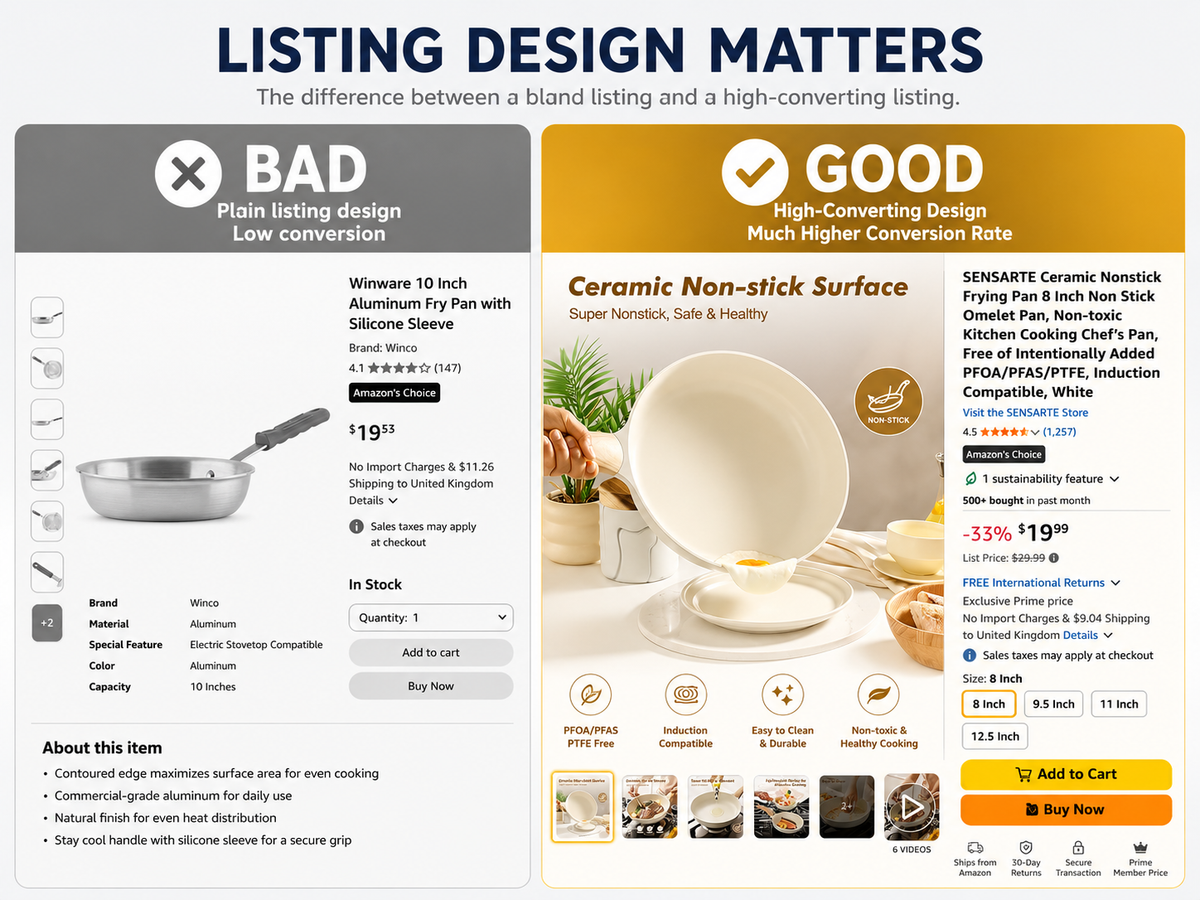
Bad listing images cost you clicks before shoppers even read your price. If your main image looks weak in search results, your CTR drops. If your secondary images do not explain the product fast, shoppers bounce. If your A+ Content looks generic, you lose trust to brands that look more premium. For Amazon FBA sellers, better images are not “branding work.” They are conversion assets.
This guide compares the best tools and services for creating Amazon listing images and A+ Content in 2026, including AI tools, DIY options, and freelancers.
Why Your Listing Images Matter More Than Your Price
Most sellers obsess over price. Price matters, but the shopper usually judges the product before they compare the final $2 difference.
Your images affect three key moments:
- Search result click — the main image decides whether the shopper clicks your listing or your competitor’s.
- Detail page trust — secondary images explain features, size, materials, use cases, and quality.
- Final conversion — A+ Content answers doubts and makes the product feel more credible.
Amazon says Basic A+ Content can increase sales by up to 8%, while Premium A+ Content can drive up to 20% higher sales. Amazon also says optimized listing content tested through Manage Your Experiments can help increase sales by up to 20–25%, depending on the test and listing quality.
That matters most in competitive categories like:
- Kitchen tools: garlic presses, food storage containers, knife sharpeners, vegetable choppers.
- Pet supplies: dog harnesses, cat water fountains, grooming brushes, pet beds.
- Fitness equipment: resistance bands, adjustable dumbbells, yoga mats, massage guns.
In these categories, shoppers often see many similar products. The listing that explains the value fastest usually wins.
How We Evaluated These Tools
We evaluated each option based on what actually matters to Amazon FBA sellers:
- Ease of use: Can a seller use it without learning design software?
- Output quality: Does the result look premium enough for Amazon?
- Amazon compliance: Does it support clean main images, correct image ratios, and A+ Content formats?
- Pricing: Is it affordable for sellers with multiple SKUs?
- Speed: Can you create assets quickly enough to test and update listings?
The best tool depends on your catalog size. A seller with 3 hero SKUs needs something different from a seller with 200 private-label SKUs.
The 7 Best Amazon Listing Image Tools
1. Saharan AI — Best for Structured, Conversion-Focused Listing Design (Get started for free!)
Saharan AI is best for Amazon sellers who want high-quality listing images and A+ Content without having to think through the full design strategy themselves.
Unlike general design tools, it is trained with e-commerce knowledge. That means it does not just generate a nice-looking image. It understands what each Amazon image needs to do: explain the product, show the benefit, highlight key features, reduce buyer doubts, and make the listing feel more trustworthy.
This makes it especially useful for sellers who want a more “brain-free” workflow. You can upload product information and product images, and the agent will structure the listing creatives for you based on conversion logic.
For example, if you sell a kitchen chopper, it can create image concepts around faster meal prep, blade quality, easy cleaning, container capacity, and what comes in the box. If you sell pet supplies, it can focus on comfort, sizing, durability, and safety. If you sell fitness equipment, it can show use cases, resistance levels, portability, and training benefits.
At the same time, it is not locked. If you want to edit the direction yourself, you can. Sellers can adjust the design, change copy, refine the creative angle, or give more specific input. So it works for both sellers who want the AI agent to handle the structure and sellers who want more control.
Best for:
- Sellers who want fast, conversion-focused listing images.
- Sellers who do not know what each Amazon image should say.
- Brands with many SKUs to update.
- FBA sellers who want structured A+ Content without hiring an agency.
- Sellers who want flexibility: automatic generation first, manual editing after.
Pricing: 90% lower than freelancers or agencies, especially when creating multiple designs.
Speed: Minutes, not days.
Skill required: Low.
Output type: Listing images, hero images, infographics, lifestyle-style creatives, and A+ Content modules.
Pros:
- Trained on e-commerce and Amazon listing logic.
- More structured than general AI image tools.
- Helps decide what each image should communicate.
- Fast enough for large catalogs.
- Flexible input: sellers can provide simple or detailed instructions.
- Good balance between automation and editability.
Cons:
- Sellers still need to review claims before uploading.
- Highly technical products may need extra manual checking.
- Best results come from clear product photos and accurate product information.
2. Canva — Best DIY Design Tool
Canva is one of the easiest DIY design tools for sellers who want to create Amazon images manually.
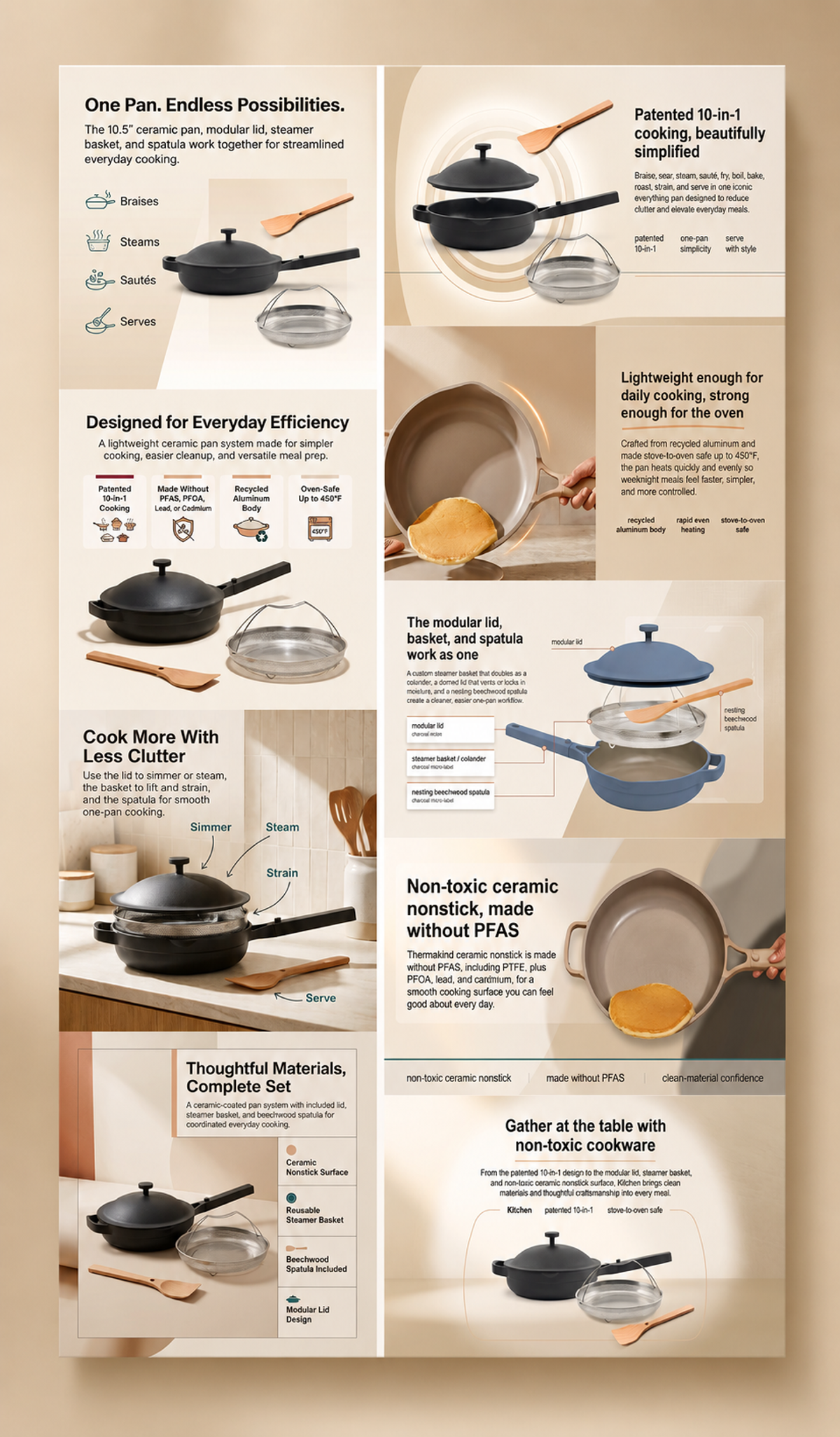
It works well if you already know what you want to design. You can create product infographics, comparison charts, lifestyle-style layouts, and simple A+ Content visuals. For example, if you sell a garlic press, you can build a template showing stainless steel material, dishwasher-safe design, ergonomic handle, and crushed garlic output.
The problem is that Canva does not think for you. It gives you the design canvas, but you still need to decide the image strategy, layout, copy, feature hierarchy, and Amazon compliance details.
Best for:
- Sellers with a small catalog.
- Sellers who already understand design basics.
- Basic infographics and comparison images.
- Budget-conscious sellers.
Pros:
- Free or low-cost.
- Easy to learn.
- Many templates.
- Good for quick edits and simple graphics.
Cons:
- Not Amazon-specific by default.
- You need to know what each image should communicate.
- Easy to make designs that look generic or template-like.
- Time-consuming for large catalogs.
[SCREENSHOT: Canva template for an Amazon product infographic or A+ module]
3. Adobe Express — Best for More Polished DIY Visuals
Adobe Express is a strong option for sellers who want a more polished DIY design workflow but do not want to use full Adobe Photoshop or Illustrator.
It is useful for creating cleaner social-style graphics, product callout images, simple lifestyle layouts, and branded visual templates. For sellers who already have decent product photos, Adobe Express can help make the listing look more premium.
For example, a fitness brand selling yoga mats could use Adobe Express to create clean images showing non-slip texture, carrying strap, thickness, and home workout use cases.
Best for:
- Sellers who want better-looking DIY graphics.
- Brands with some design sense.
- Sellers who already have strong product photography.
- Simple image editing and branded templates.
Pros:
- More polished than many basic design tools.
- Good for brand consistency.
- Easier than full Adobe Creative Cloud tools.
- Useful for social, ads, and Amazon images.
Cons:
- Still requires manual design judgment.
- Not built specifically for Amazon conversion.
- Sellers must plan image structure themselves.
- Can take time if you have many SKUs.
4. Fiverr — Best for One-Off Freelance Design
Fiverr can be useful when you need a human designer for one important listing.
For example, if you have a hero SKU in kitchen appliances, premium pet accessories, or home fitness equipment, a good freelancer can create polished images with more manual control. This can work well when you have a clear brief and only need a few listings designed.
The downside is quality control. One freelancer may be excellent, while another may use generic templates. Revisions can also take days, which slows down testing.
Best for:
- Sellers with one or two key SKUs.
- Products needing custom layouts.
- Sellers who do not want to use AI tools.
- Brands that want a human designer for a specific project.
Pros:
- Human design judgment.
- Custom design possible.
- Good for premium hero products.
- Wide range of pricing options.
Cons:
- Quality varies a lot.
- Slower than AI tools.
- Revisions can become painful.
- Expensive if you have many SKUs.
5. Upwork — Best for Ongoing Designer Support
Upwork is better than Fiverr if you want to build a longer-term relationship with a designer.
This is useful for sellers with a growing catalog who need consistent image updates, A+ Content refreshes, packaging edits, storefront graphics, and ad creatives. You can hire someone who learns your brand and keeps visual consistency across multiple listings.
For example, if you sell a full pet supplies catalog, an ongoing designer can help maintain the same style across dog harnesses, pet beds, grooming brushes, and feeding accessories.
Best for:
- Sellers who want ongoing design support.
- Brands with a larger catalog.
- Sellers who need regular creative updates.
- Teams that want a human designer but not a full agency.
Pros:
- Better for long-term design consistency.
- More control than one-off gigs.
- Can support multiple creative needs.
- Useful if you want a designer to learn your brand.
Cons:
- Requires management.
- Takes time to find the right person.
- More expensive than AI tools.
- Turnaround depends on freelancer availability.
6. Jungle Scout — Best for Listing Research and Optimization Support
Jungle Scout is not mainly a design tool, but it is useful for sellers who want to understand their market before creating images.
It helps sellers research products, keywords, competitors, sales estimates, and listing opportunities. This can support your image strategy because good listing images should reflect what buyers care about in that category.
For example, if you sell resistance bands, Jungle Scout can help you understand competitor positioning, keyword demand, and product angles. You can then use that research to decide which benefits to show in your images: resistance levels, portability, workout examples, or accessories included.
Best for:
- Product research.
- Competitor research.
- Keyword and listing optimization.
- Sellers who want data before creating images.
Pros:
- Strong Amazon seller research workflow.
- Useful for understanding category demand.
- Helps identify competitor gaps.
- Good for product and listing planning.
Cons:
- Not mainly a visual design tool.
- You still need another tool or designer to create images.
- Better for research than creative execution.
7. Helium 10 — Best for Keyword and Listing Optimization Workflow
Helium 10 is another major Amazon seller platform. Like Jungle Scout, it is not mainly for image design, but it is useful for the broader listing optimization process.
It can help with keyword research, listing analysis, competitor tracking, and product research. This matters because your image copy should match what shoppers care about. If customers are searching for “dishwasher safe garlic press,” “no pull dog harness,” or “heavy resistance bands,” those benefits should appear clearly in your listing content and images.
Best for:
- Keyword research.
- Listing optimization.
- Competitor analysis.
- Sellers who want to improve the full product detail page.
Pros:
- Strong Amazon keyword tools.
- Useful for listing copy and positioning.
- Helps identify buyer search intent.
- Good for sellers managing multiple ASINs.
Cons:
- Not a dedicated image design tool.
- Visual creative still needs to be made elsewhere.
- Can feel complex for beginners.
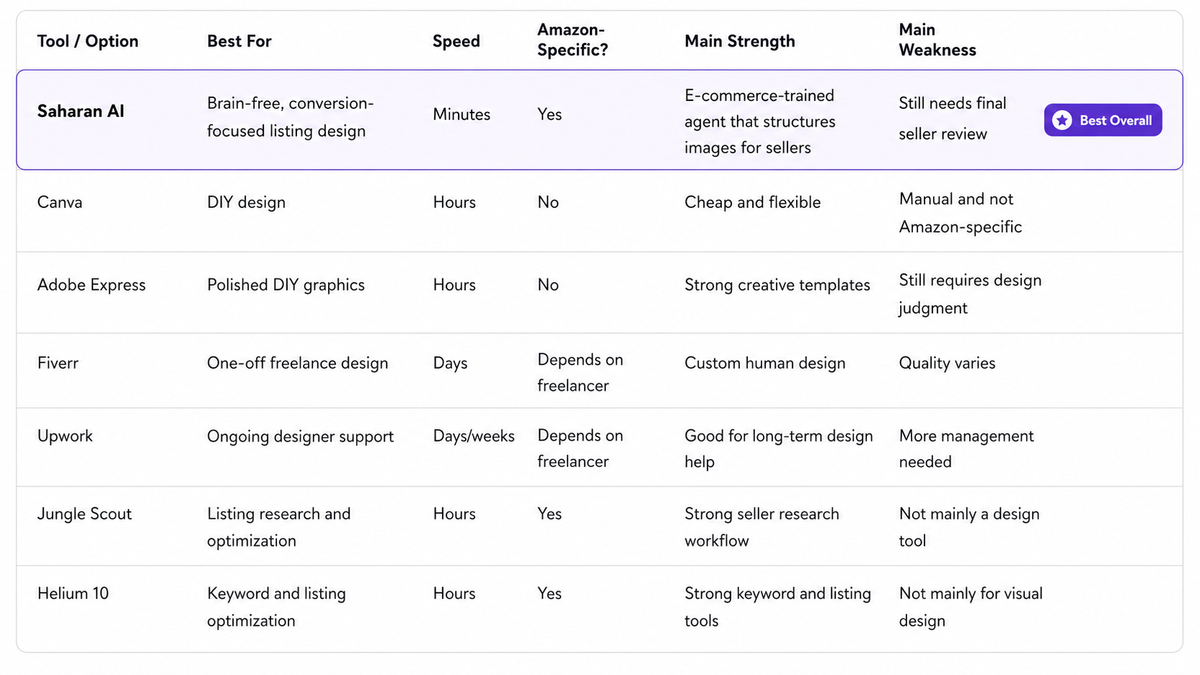
Comparison Table
Which Tool Should You Choose?
For most Amazon sellers, Saharan AI is the best overall choice because it combines speed, structure, e-commerce knowledge, and flexibility in one workflow.
Tools like Canva and Adobe Express are useful if you want to design everything yourself. Fiverr and Upwork can work if you want a human designer. Jungle Scout and Helium 10 are strong for research. But if your goal is to create conversion-focused Amazon listing images and A+ Content quickly, without planning every image from scratch, Saharan AI is the strongest all-around option.
It works especially well because the agent is trained on e-commerce knowledge. It does not just create random nice-looking visuals. It understands what Amazon images are supposed to do: win the click, explain the product, highlight benefits, reduce buyer doubts, and make the listing feel more trustworthy.
For example, if you sell a vegetable chopper, Saharan AI can structure images around faster meal prep, blade quality, easy cleaning, container capacity, and what comes in the box. If you sell a dog harness, it can focus on comfort, sizing, durability, safety, and no-pull use cases. If you sell resistance bands, it can show resistance levels, exercise examples, portability, and beginner-to-advanced use cases.
That makes it suitable for sellers who want a “brain-free” workflow. You can provide basic product information and product photos, and the agent can generate a full listing image direction for you. But it is also flexible. If you want to control the creative direction, adjust the copy, change the layout, or provide more detailed inputs, you can do that too.
If you want the best overall option
Use Saharan AI.
It is the best fit for sellers who want fast, structured, conversion-focused listing images and A+ Content without hiring a designer or manually building every asset in Canva.
This is especially useful if you have multiple SKUs, limited time, or no design background. For example, if you sell 40 kitchen tools, manually designing every listing image set would take too long. You need a tool that can understand your product, decide what each image should communicate, generate the structure, and still let you edit the output after.
If you have no budget
Use Canva.
Canva works if you only have a few SKUs and you are comfortable doing the work yourself. For example, if you sell three kitchen accessories, you can create one basic template and reuse it across products.
The downside is that Canva does not understand Amazon conversion strategy. You still need to decide what each image should say, how to structure the benefit, what claims to include, and how to avoid making the design look too generic.
If you want more polished DIY visuals
Use Adobe Express.
Adobe Express is a good middle-ground option if you want better-looking visuals than basic templates but still want to create things yourself. It works best when you already have strong product photos, clear brand colors, and some design judgment.
However, like Canva, it is still a DIY tool. It can help you make the design look better, but it will not automatically decide the best Amazon image structure for your product.
If you have one hero product
Use Fiverr or Upwork.
If one product drives most of your sales, it can be worth hiring a strong freelancer. For example, if your main product is an adjustable dumbbell set, premium dog harness, or high-ticket kitchen appliance, a freelancer can help you create custom lifestyle images, comparison graphics, and A+ Content modules.
This works best when you have a clear brief. The downside is speed, cost, and consistency. Quality varies a lot, and revisions can take days.
If you need listing research first
Use Jungle Scout or Helium 10.
These tools are useful for keyword research, competitor analysis, and product positioning. They can help you understand what buyers care about before creating images.
For example, if customers are searching for “dishwasher safe garlic press,” “no pull dog harness,” or “heavy resistance bands,” those benefits should appear clearly in your listing images. But Jungle Scout and Helium 10 will not replace a design tool. You still need another tool or designer to create the actual visuals.
A Simple Amazon Image Structure Sellers Can Follow
For most products, your image set should not be random. Each image should have a clear job.
- Main image: Win the click.
- Image 2: Show the core benefit.
- Image 3: Show size, dimensions, or what’s included.
- Image 4: Show the product in use.
- Image 5: Show material, quality, or trust.
- Image 6: Compare against alternatives.
- A+ Content: Explain the full story and reduce doubt.
This is where Saharan AI is especially useful. Instead of asking sellers to figure out the image structure themselves, it can automatically build the creative direction around the product, category, and buyer decision process. (Check this article for how to create high-converting A+ content)
Practical Image Strategy by Category
Kitchen Tools
For kitchen tools, shoppers care about convenience, cleaning, durability, and size.
A vegetable chopper listing should not only show the product. It should show:
- Chopped vegetables inside the container.
- Blade material.
- Dishwasher-safe parts.
- Storage size.
- Before/after prep time.
- What comes in the box.
A tool like Saharan AI can help turn these selling points into a structured image set, so the listing does not feel like a random collection of product photos.
Pet Supplies
For pet products, trust matters. Shoppers worry about safety, comfort, size, and durability.
A dog harness listing should show:
- Fit on different dog sizes.
- Adjustable straps.
- Reflective stitching.
- Clip strength.
- No-pull function.
- Size chart.
Do not rely only on cute dog photos. Cute images may get attention, but buyers still need sizing and safety information before they buy.
Fitness Equipment
Fitness buyers want to know whether the product fits their routine.
A resistance band listing should show:
- Resistance levels.
- Exercise examples.
- Door anchor or handles if included.
- Portability.
- Material strength.
- Beginner vs advanced use cases.
The best images help the shopper imagine using the product immediately.
FAQ
What is the best Amazon listing image tool in 2026?
For most Amazon sellers, Saharan AI is the best overall option because it combines Amazon-specific design structure, e-commerce knowledge, speed, and flexibility. Canva and Adobe Express are good DIY tools, but they require more manual planning.
Is Canva good enough for Amazon listing images?
Canva is good enough for simple graphics if you know exactly what you want to create. The problem is that Canva does not automatically understand Amazon conversion strategy, so you still need to plan every image yourself.
Should I use Fiverr or Upwork for Amazon images?
Use Fiverr for one-off projects and Upwork for longer-term designer support. Both can work well, but quality depends heavily on the person you hire, your brief, and how many revisions you need.
Are Jungle Scout and Helium 10 image design tools?
No. They are better for product research, keyword research, and listing optimization. They can help you decide what benefits to highlight, but they will not create the actual listing images for you.
Can I use AI-generated images on Amazon?
Yes, but you are responsible for accuracy and compliance. Always check that your images do not misrepresent product size, materials, features, certifications, or included accessories.
Summary
If you only have a few SKUs and enjoy designing, Canva or Adobe Express can work. If you have one important product and a larger budget, Fiverr or Upwork may be useful. If you need research, Jungle Scout and Helium 10 can help you understand the market.
But for most Amazon FBA sellers who want fast, structured, conversion-focused listing images and A+ Content, Saharan AI is the best overall choice. It gives sellers the benefit of an e-commerce-trained design agent while still allowing flexibility if you want to edit or guide the output yourself.
The real goal is not just to make your listing look better. It is to make every image answer a buyer question: What is it? Why is it better? Will it fit my need? Can I trust it?
Start with your top 5 ASINs, improve the image set, refresh your A+ Content, and track the results before updating the rest of your catalog.