
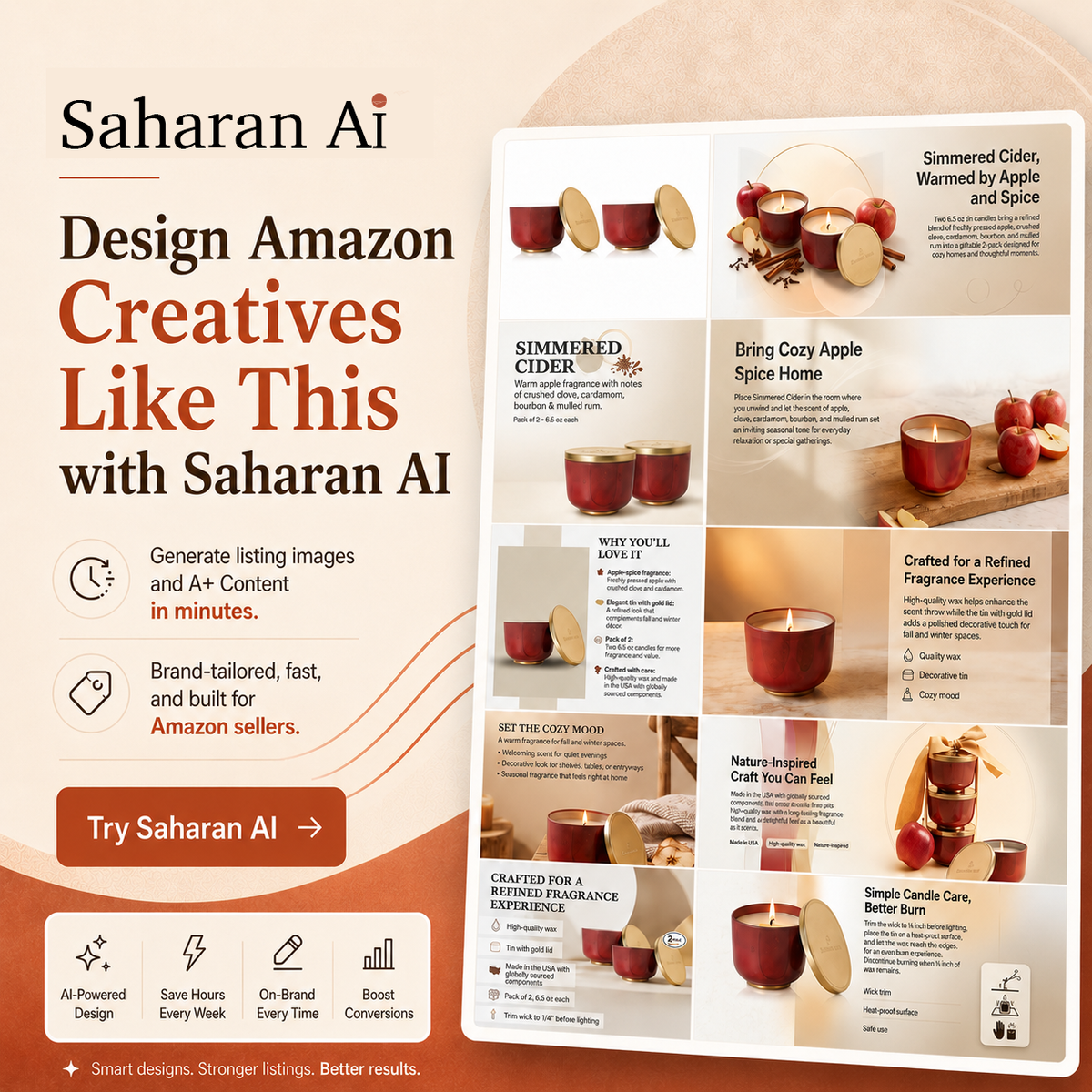
If you're selling on Amazon and your A+ content was built by a freelancer two years ago, you're leaving money on the table. Amazon's own data shows A+ content lifts conversion by 3–10%, but where you land in that range depends almost entirely on design quality, not copy. The faster, cheaper way to get there in 2026 is to use an AI Amazon listing image generator to build your modules in under an hour, then iterate based on what actually converts. This guide walks you through exactly how to do it, with category-specific examples for supplements, pet, kitchen, and fitness brands.
Throughout this guide, we'll use Saharan AI as the example tool — it's built specifically for Amazon sellers and handles both listing images and full A+ content modules in one workflow.
What Amazon A+ Content Actually Is (and Why Sellers Get It Wrong)
A+ Content is the enhanced visual section that replaces your plain-text product description on Amazon listings. Standard A+ is available to all Brand Registered sellers and gives you up to five modules per listing. Premium A+ (formerly A++) unlocks larger modules, video, and interactive comparison charts but typically requires either an invitation or hitting a sales threshold.
Amazon currently offers seven core module types: image headers with text, image and dark text overlay, four-image and text quadrants, comparison charts, standard company logo, image and light text, and standard text. Most sellers default to using whichever modules their freelancer suggested, without thinking about whether the layout matches how buyers actually shop their category.
The most common mistakes I see across listings:
- Modules packed with paragraph-length text that nobody reads on mobile
- Low-resolution lifestyle shots pulled from stock libraries that don't match the actual product
- Module sequences that don't follow buying logic — for example, a brand story module before the buyer has even seen what the product looks like in use
- Identical layouts copy-pasted across every SKU in a catalog, regardless of category
Fix those four things and you're already ahead of 70% of competing listings!
Why Conversion Rates Hinge on Visual Design, Not Copy
Most sellers obsess over their bullet points and title. Both matter, but neither moves the needle once a buyer has clicked into your listing. By that point, the decision is visual.
The 3–10% conversion lift Amazon reports for A+ content is a wide range for a reason. Sellers with strong visual hierarchy, clear product representation, and modules that answer specific buyer objections land near the top of that range. Sellers with generic stock imagery and text-heavy modules land near the bottom — sometimes seeing no lift at all.
The most useful way to think about each module is as an objection-handler. Buyers click "Add to Cart" when their last remaining objection is answered. So instead of designing modules around your product features, design them around the questions that stop people from buying. For a collagen powder, that might be "will it dissolve in cold water?" For a dog harness, it's "will it actually fit my breed?" Each module should kill one objection — the same principle the Saharan AI team writes about in why visual-first selling is replacing copy-first selling online.
This is why most sellers under-invest in design and over-invest in copy revisions — copy feels more controllable, but design is what buyers actually process first.
The Old Way vs. The AI Way: A Cost and Time Breakdown
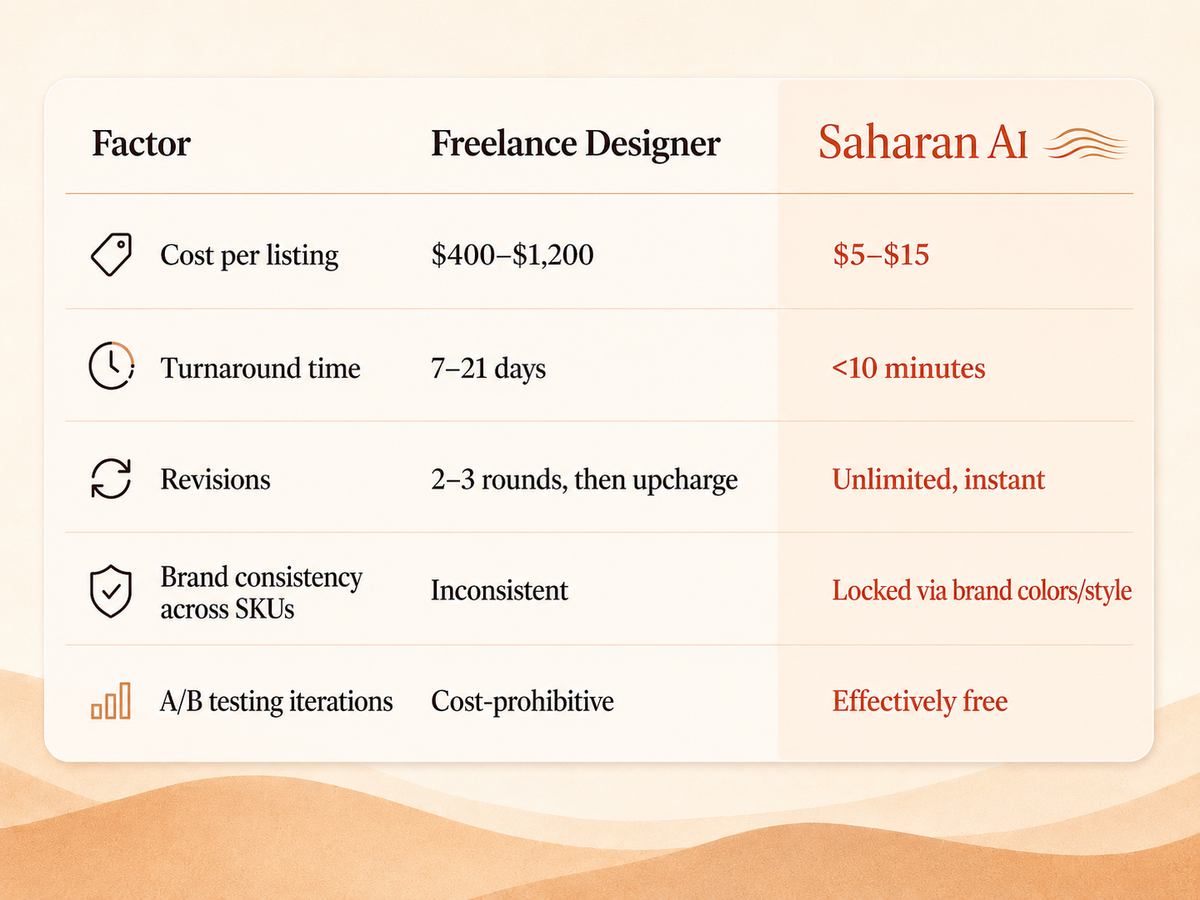
Here's how the two workflows compare for a single SKU:
The traditional A+ workflow
You brief a freelancer or agency, send product photos, wait 5–7 days for a first draft, request revisions, wait another 3–5 days, license stock photos for lifestyle shots, sometimes commission a photoshoot for $800+, and end up with one layout that's hard to iterate on. If your brand has 15 SKUs and different designers worked on them over 18 months, your catalog looks inconsistent — which Amazon's algorithm and your buyers both notice.
The Amazon Listing Design AI Agent with Saharan AI
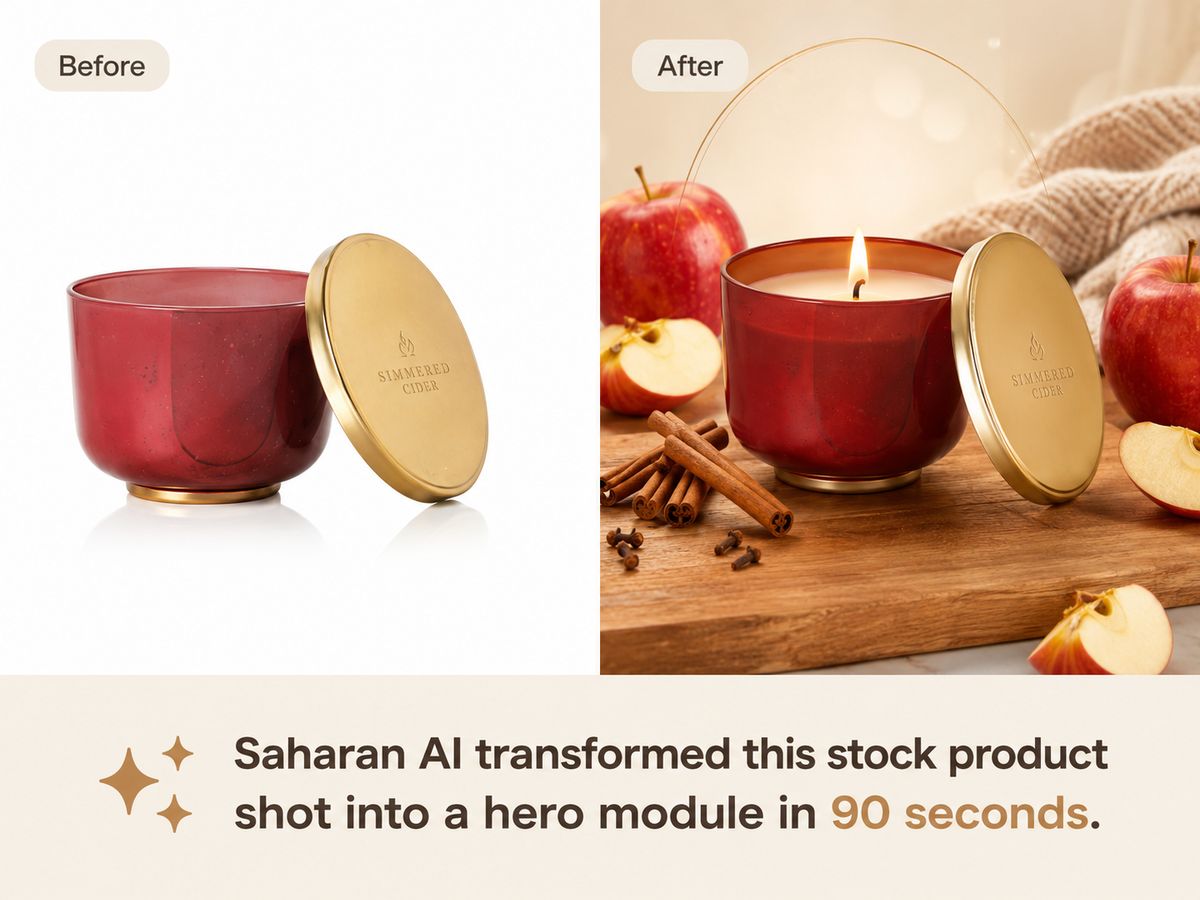
You upload one product photo, generate a full set of A+ modules in under 30 minutes, run a built-in Amazon compliance check, and export at the exact dimensions Seller Central requires. Iteration cost drops close to zero, so you can run actual A/B tests instead of guessing which hero image works better. If you want a deeper view of where AI design tooling actually stands today versus the hype, this breakdown on how far we are from replacing graphic designers with AI is worth reading before you commit your catalog to any tool.
How to Use Saharan AI to Build Your A+ Content (Step-by-Step)
Saharan AI's Amazon Listing Design Agent is built around three things: it studies your brand DNA before generating anything, it lets you brief it the way you'd brief a graphic designer, and it benchmarks design decisions against what's already working in your product category. Here's exactly how to use it.
Step 1 — Set up your brand DNA (one-time setup)
This is the most important step, and it's the one most sellers skip. Before you generate a single image, Saharan AI needs to understand your brand identity so every output looks like it came from your in-house team, not a stock template.
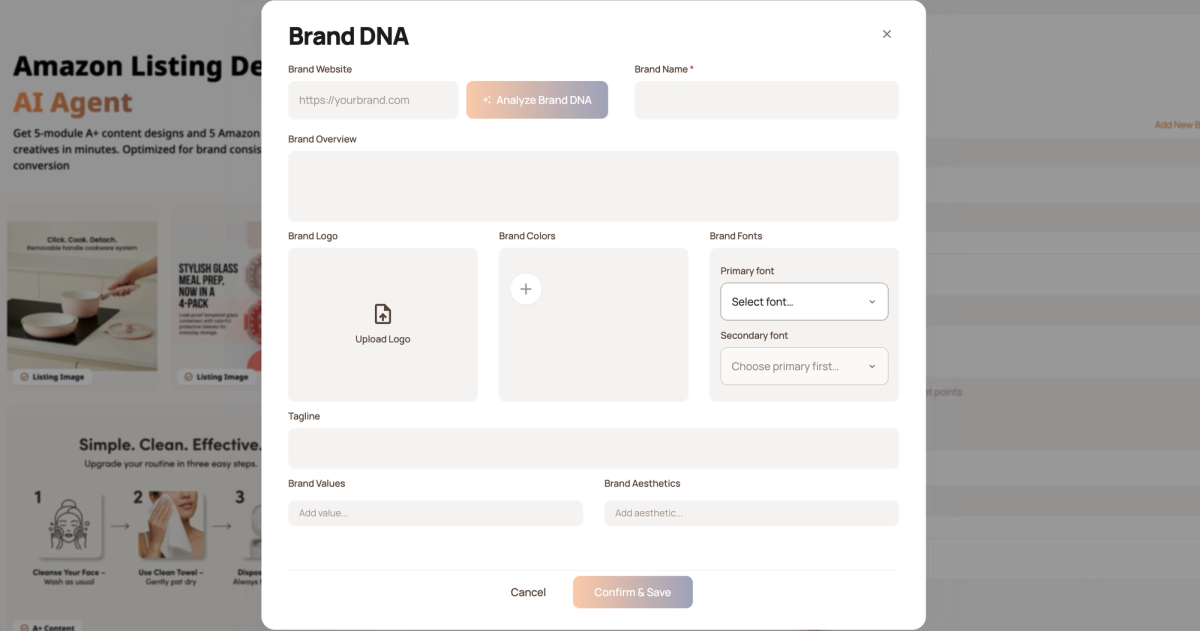
On the agent page, click Add New Brand. You have two options:
- Auto-generate (recommended): Paste your brand website URL or your Amazon brand store URL, then click Analyze Brand DNA. In a few seconds, Saharan AI generates a complete brand profile — colors, typography, tone, visual style — pulled directly from your existing brand presence.
- Manual entry: Fill in the brand details yourself if you don't have a live site yet.
Review the generated profile, edit anything that's off, and upload your brand logo. Click Confirm and Save. You only do this once per brand — you can always go back to the brand page later to update it as your brand evolves.
Step 2 — Name your campaign
Back on the Amazon Listing Design Agent page, the first field is Campaign Name. This is optional but useful if you're managing multiple SKUs or design variations — name it something simple like "Collagen Powder — Spring Refresh" so you can find it later.
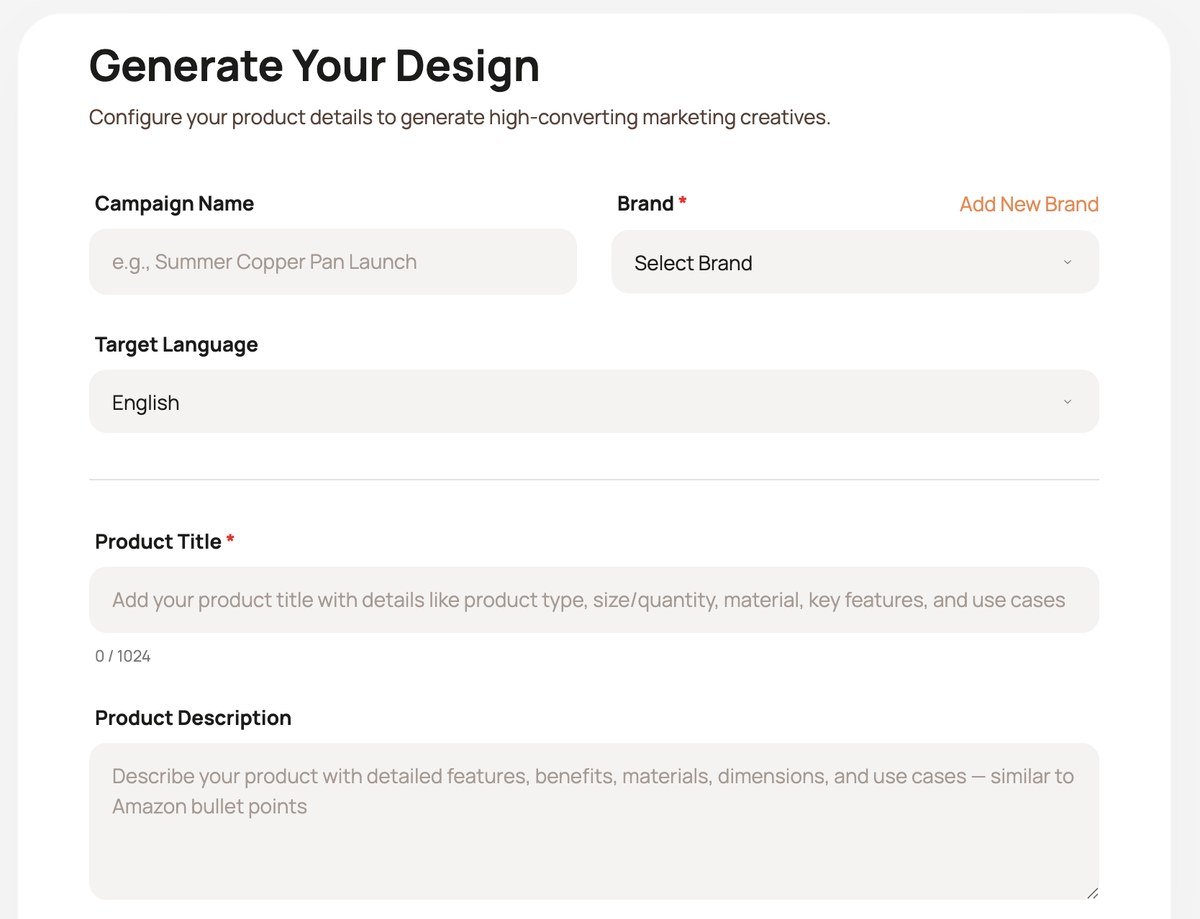
Step 3 — Fill in your product details
This is where the quality of your input directly determines the quality of your output. Three required fields:
- Product title (required): Include what the product is, what it does, and any key details. Don't just write the SKU name — give Saharan AI enough context to understand the product clearly. For a kitchen example: "Electric gooseneck kettle with variable temperature control for pour-over coffee and tea."
- Product description: Go deeper here. Cover your target audience, main use cases, how the product is actually used, and any features you want Saharan AI to emphasize. For a pet harness, you'd describe the breeds it fits, the typical use case (daily walks vs. hiking), and the safety features that matter most.
- Target keywords: Add the keywords you're targeting on your Amazon listing. Saharan AI works these into the design strategy itself, not just the copy — so visual elements reinforce the keywords your buyers are searching.
Step 4 — Upload your product images
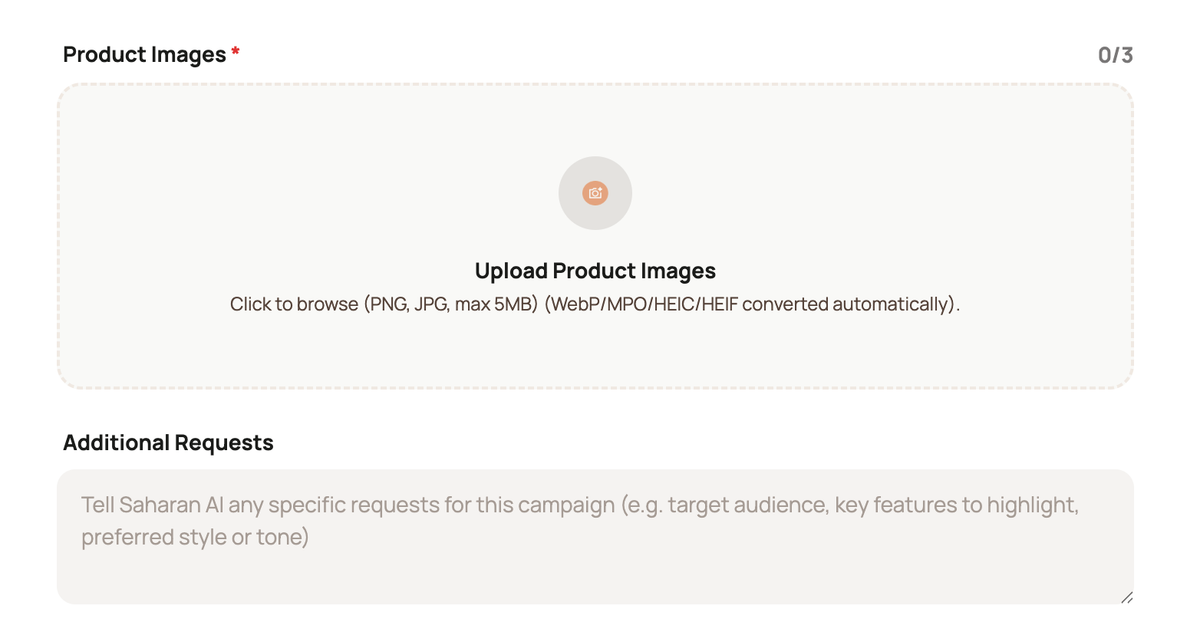
You can upload up to three product images. The goal isn't polish — it's coverage. Phone photos are fine. Real-life use-case shots are great.
The single most important thing: show as much of the product as possible, from different angles. One front shot, one angle shot, one in-use shot is the ideal trio. This gives Saharan AI a complete understanding of what your product actually looks like in three dimensions, which is what prevents the AI from generating distorted or inaccurate lifestyle scenes later.
Step 5 — Add your specific creative requests
The Additional Requests field is where you direct the creative output. This is the part that sellers underuse. Be specific about scenes, settings, mood, or anything you want emphasized.
Examples of strong additional requests by category:
- Home goods (artificial olive tree): "Show the product in realistic everyday home settings — modern living rooms, sunlit entryways, minimalist offices."
- Supplements: "Show the product on a clean kitchen counter next to a morning coffee setup. Target audience is women 30–45 focused on wellness."
- Pet supplies: "Show the harness on three different dog breeds — small (French bulldog), medium (border collie), large (golden retriever) — in outdoor walking scenarios."
- Fitness equipment: "Show the product in both a home gym setting and a professional studio. Include shots that emphasize portability and storage."
The more specific your brief, the more usable the first generation will be.
Step 6 — Generate and review your full output
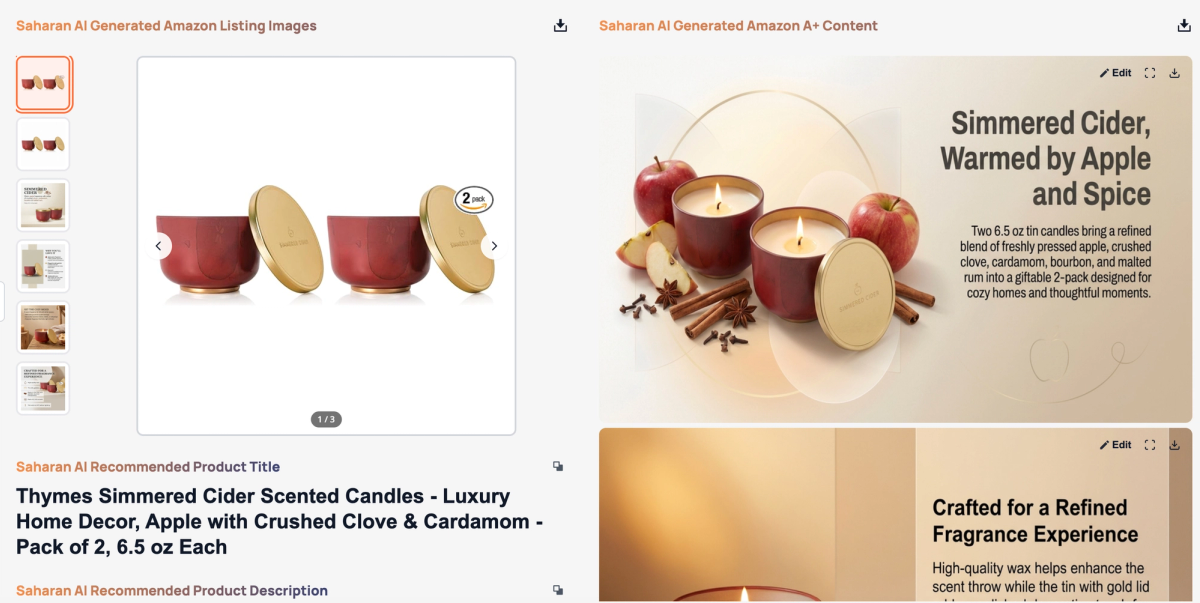
Click Generate, then wait 2–5 minutes. Saharan AI produces a complete listing set in one run:
- 5 Amazon listing images ready to use at the top of your listing page (positions 2–7 in your image carousel)
- An SEO-optimized product title
- An SEO-optimized product description
- A 5-module Amazon A+ Content set
Everything uses your brand colors, brand fonts, and a consistent campaign style — so the listing images and the A+ modules look like they belong together. This is the part that most listings get wrong: the hero image looks like one brand and the A+ content looks like a different brand. Generating both together solves that automatically.
Create your first design free → saharan.ai
Step 7 — Edit individual modules until they're right
You almost never use the first generation as-is, and you shouldn't. Each A+ module has its own Edit button.
When you click edit, you can:
- Update the heading (e.g., change "Premium Quality" to something more specific to your product)
- Change the body text for that module
- Add edit instructions describing what you want changed visually — for example, "change the background to a warmer wood tone" or "replace the kitchen scene with a bathroom counter scene"
Click Generate again and Saharan AI updates just that module in about a minute. You can iterate on individual modules without regenerating the entire campaign, which is the difference between testing a small change and rebuilding from scratch.
Frequently Asked Questions
How long does it take to create A+ content with an AI generator?
Most sellers complete a full 5-module A+ layout in less than 10 minutes per SKU using an AI tool, compared to 1–3 weeks with a freelancer. The longest step is usually choosing between scene variations, not the generation itself.
Will Amazon reject AI-generated A+ content?
No, Amazon's current policy encourage AI-generated imagery as long as it accurately represents the product. Rejections typically come from prohibited claims, competitor logos accidentally left in scenes, or distorted product representation — not from the imagery being AI-generated.
How much does an AI Amazon listing image generator cost compared to a freelancer?
Most AI tools run $20-$50 per design, versus $400–$1,200 per listing for freelance design work. You break even at roughly one SKU per month, and the cost advantage compounds fast across a full catalog.
Can I use the same AI-generated images for my Amazon main listing photos?
Yes for lifestyle and infographic images in positions 2–7 of your image carousel. The main hero image in position 1 must still be a real product photo on a pure white background per Amazon's TOS — that's non-negotiable.
What's the difference between an amazon product image generator and an amazon a+ content generator?
A product image generator handles the seven listing carousel images that appear at the top of your product page. An A+ content generator builds the full module layouts (comparison charts, feature grids, brand story) that appear below your bullet points. Some tools handle both in one workflow, such as Saharan AI.
Summary
High-converting Amazon A+ content in 2026 comes down to four things: matching your module sequence to how buyers actually shop your category, designing each module to kill one specific objection, keeping visual consistency across your catalog, and iterating monthly instead of treating A+ as a one-time project.
You don't need to spend $1,000 or wait three weeks to get there. An AI Amazon listing image agent (Saharan AI) gets you a complete, compliant, on-brand layout in under an hour — and more importantly, it makes iteration cheap enough that you'll actually do it. Start with your weakest SKU, measure the lift over 30 days, and use what you learn to scale across the rest of your catalog.
Turn the next idea into finished design.
Bring your brief, product, and references into a specialist AI design workflow built for real creative work.